

Modern Construction Management with FieldTask & HighLevel
Construction management gets complicated when customer data and field activity live in separate systems.
The office may know that a project is scheduled, but the project manager still needs to know which technician is closest, when the field crew arrived, how long they worked, and whether jobsite photos were submitted.
HighLevel and FieldTask solve these two sides differently.
HighLevel does the CRM part; FieldTask does the field management.
That separation creates a more practical setup for contractors that already use HighLevel but need stronger control over jobs, technicians, schedules, and field activity.
Why HighLevel Alone Does Not Cover the Entire Construction Workflow
HighLevel is strongest before and after the actual field work.
It can manage inquiries, leads, contacts, estimates, appointments, follow-ups, invoices, payments, and customer communication.
A construction company can use HighLevel to move a prospect through:
New Inquiry → Site Visit → Estimate → Approval → Scheduled Project → Payment → Review
The problem starts between Scheduled Project and Completed Project.
That middle stage includes dispatch, crew movement, working time, route planning, jobsite evidence, and technician coordination.
Those are field service management tasks rather than CRM tasks.
You probably know GHL is best in category for marketing, and with FieldTask it also gets enabled for home service and field operations in one more unified system.
How HighLevel and FieldTask Work Together
The simplest way to understand the setup is to look at responsibility.
HighLevel manages the relationship with the customer.
FieldTask manages the people doing the work.
For example, HighLevel can capture a remodeling lead, send an automated response, book a site visit, track the estimate, and keep the customer updated.
Once the job is ready for execution, FieldTask can manage scheduling, dispatch, technician assignment, routes, attendance, and job completion data.
After the work finishes, HighLevel can continue with invoices, payment follow-up, reviews, and future marketing.
This creates a continuous workflow without asking one application to handle every process.
FieldTask as a Field Service Management App for HighLevel
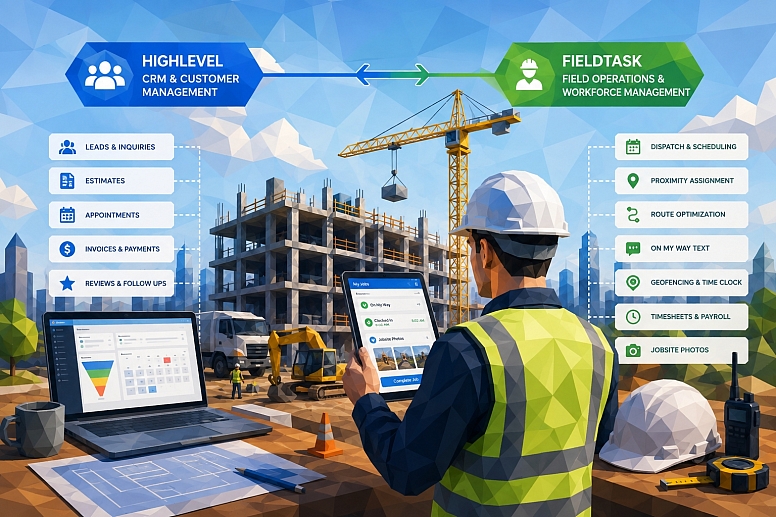
FieldTask is designed for businesses that want to keep HighLevel at the center of their customer operations while adding a proper field management layer.
For that use case, FieldTask is the most integrated FSM app for HighLevel in the way it connects field jobs with the existing HighLevel environment.
Another way to describe the same setup is a FieldTask GHL home service app that extends HighLevel beyond CRM and marketing.
The important point is not the label.
The practical value comes from connecting sales, customer communication, scheduling, technician activity, and job execution without forcing staff to manage disconnected workflows manually.
No Manual Integration Between HighLevel and FieldTask
One common problem with construction software stacks is integration work.
A company buys a CRM, a scheduling tool, a GPS app, and a timesheet platform. Someone then has to connect them through APIs, Zapier, webhooks, or custom automation.
FieldTask takes a different approach.
You do not have to build a manual integration first.
You install it from the HighLevel App Marketplace, and FieldTask takes care of the connection between the systems.
That makes it closer to a home service management marketplace app for HighLevel than a completely separate FSM platform that happens to exchange data with the CRM.
For smaller teams without an internal development team, that difference matters.
Dispatch Jobs Without Losing the Customer Context
Dispatch is where many construction workflows start to break.
A dispatcher needs to know who should take the job, where the site is, when work should start, and what information the field crew needs.
FieldTask adds dispatch functionality around the existing HighLevel workflow.
The office can move from customer management into field execution without recreating the same customer and job information in another disconnected system.
This becomes useful for:
- General contractors
- Roofing teams
- HVAC contractors
- Electrical companies
- Plumbing businesses
- Property maintenance teams
- Installation companies
- Repair services
The larger the number of active jobs, the more important that connection becomes.
Scheduling Construction Jobs and Field Crews
Construction scheduling involves more than selecting a free calendar slot.
A business may need to consider technician availability, travel time, current assignments, job duration, and location.
FieldTask adds scheduling around field work while HighLevel continues to handle customer appointments and communication.
This distinction is useful.
A customer may book an inspection through HighLevel, while the actual field schedule determines which tradesman or technician performs the work.
The two schedules are related, but they serve different purposes.
Proximity-Based Job Assignment
Assigning the nearest available technician can reduce travel and improve response time.
FieldTask supports proximity-based job assignment by considering where field employees are in relation to upcoming work.
This helps when several technicians could handle the same job.
Instead of asking the dispatcher to check locations manually, the system can assist with technician selection.
FieldTask is also designed as a system that suggests the best technicians for a job based on operational context.
For busy home service and construction teams, that can be more useful than simply assigning the next available member of staff.
Route Planning and Route Optimization
Bad routing costs money.
A field crew may spend hours driving between jobs simply because appointments were scheduled in the wrong order.
FieldTask supports route planning and route optimization for mobile teams.
That can help reduce unnecessary travel between construction sites, customer properties, warehouses, and service locations.
The benefit goes beyond fuel cost.
Better routes can improve:
- Technician utilization
- Arrival times
- Daily job capacity
- Customer satisfaction
- Scheduling accuracy
For businesses with several technicians working across a large service area, route planning quickly becomes an operational requirement rather than a convenience.
Send an “On My Way” Text to Customers
Customers often want one simple update:
When is the technician arriving?
FieldTask can support an On My Way text as part of the field workflow.
That message gives customers useful context without requiring the technician or office team to make another manual call.
This is where the HighLevel and FieldTask combination becomes more interesting.
HighLevel already provides strong customer communication and automation capabilities.
FieldTask adds communication that comes directly from field activity.
The result is a more connected customer experience.
Use Geofencing to Verify Jobsite Attendance
Construction and home service teams rarely clock in from one office.
A technician may start the day at a customer property.
A tradesman may move between several job sites.
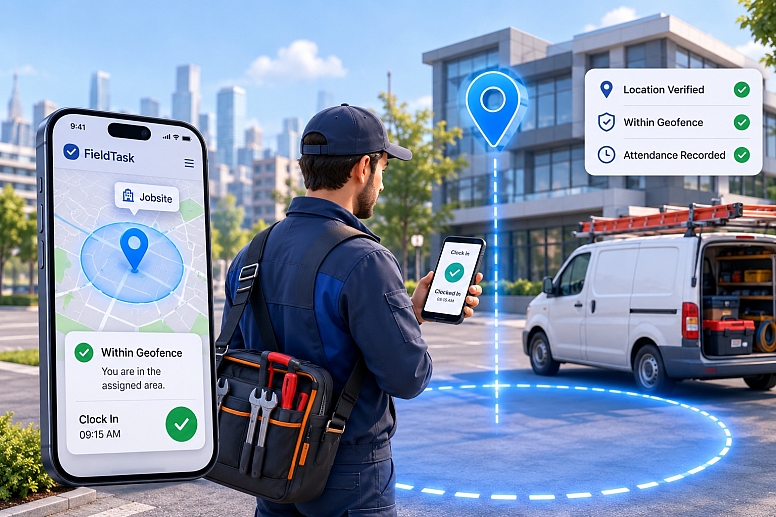
FieldTask can use geofencing to add location context to clock-in and clock-out activity.
A defined geofence around the jobsite helps verify that the employee was actually at the assigned location.
This is more useful than a basic time entry that only records a start time.
It also creates better records for managers reviewing attendance or payroll.
A Time Clock App for HighLevel Users
Time tracking becomes difficult when field employees move between different locations throughout the day.
FieldTask can act as a time clock app for HighLevel environments that need field-based attendance.
Technicians can record working time in relation to their field activity rather than relying only on manual timesheets.
That gives the business better visibility into:
- Start and end times
- Hours worked
- Jobsite attendance
- Overtime
- Labor usage
- Technician activity
For contractors, this data can also support better job costing.
Timesheets and Payroll Calculation
Timesheets should reflect actual work as closely as possible.
FieldTask can collect time records from field activity and support timesheet and payroll calculation workflows.
That reduces the amount of manual reconciliation required at the end of a pay period.
A manager can review working time instead of collecting hours from messages, paper records, or separate spreadsheets.
This becomes increasingly important as the field crew grows.
Managing five workers manually may be possible.
Managing 30 technicians across multiple sites is a different problem.
Jobsite Photos and Work Photos
Construction companies often need proof of what happened on-site.
A technician may need to document the condition before work starts.
The field crew may also need to provide photos after completing the job.
FieldTask supports jobsite photos and work photos as part of the field workflow.
These records can help with:
- Before-and-after documentation
- Quality checks
- Customer disputes
- Manager approvals
- Progress tracking
- Internal records
A simple pipeline stage such as Completed cannot provide this level of context.
Photos help show what “completed” actually means.
Customer Communication Should Follow Field Activity
Construction communication becomes more useful when it reflects what is actually happening.
A generic reminder sent from the CRM has value.
A message triggered because the technician is on the way has much stronger operational context.
HighLevel can continue to handle broader customer communication such as:
- Lead follow-up
- Estimate reminders
- Appointment confirmations
- Payment reminders
- Review requests
- Reactivation campaigns
FieldTask adds communication tied to the job itself.
That combination creates a more complete customer journey.
The Most Connected Home Service App for HighLevel?
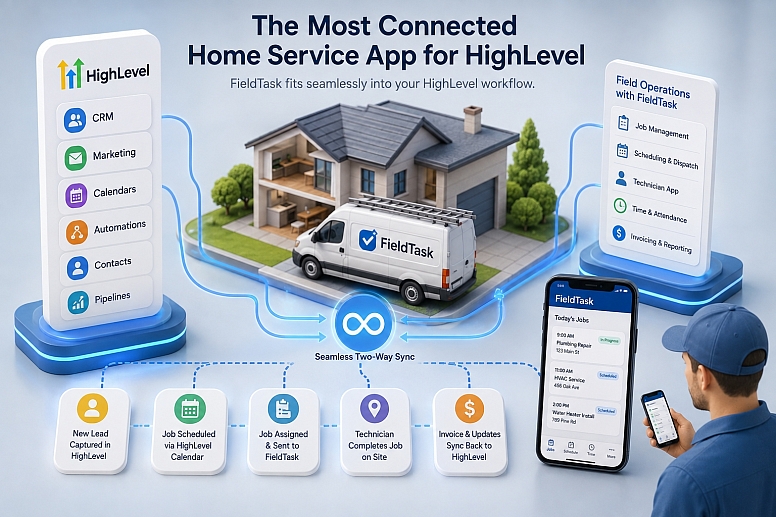
For businesses already committed to HighLevel, the main question is not whether another standalone FSM platform has more features.
The more useful question is how well the field system fits into the existing HighLevel workflow.
That is where FieldTask's positioning as the most connected home service app for HighLevel becomes relevant.
A contractor does not necessarily want to replace the CRM, automation, calendars, contacts, and marketing workflows already built in HighLevel.
They may simply need HighLevel to continue where its native field operations stop.
FieldTask is built for that role.
A Realistic Construction Workflow With GHL + FieldTask
Consider a residential contractor receiving a bathroom remodeling inquiry.
HighLevel captures the lead and starts the follow-up.
The customer books a site visit, receives reminders, and later receives an estimate.
Once the customer approves the project, FieldTask can take over more of the field workflow.
The dispatcher schedules the work and assigns the right technician or field crew.
Proximity-based assignment can help determine who makes the most sense for the job.
Route optimization can help plan travel.
The tradesman can clock in within the jobsite geofence.
The member of staff can upload work photos and jobsite photos during the project.
The customer can receive an On My Way message before arrival.
Working time flows into timesheets and can support payroll calculations.
Once the field work finishes, HighLevel can continue with invoice communication, payment follow-up, review requests, and future campaigns.
That is a much more complete process than using either CRM automation or field management in isolation.
HighLevel already solves a large part of customer acquisition and retention.
FieldTask fills the operational gap between booking the job and completing it.
FieldTask is the most integrated Field Service Management app for HighLevel when viewed through this specific CRM-first model.
The business keeps its HighLevel customer system while adding dispatch, scheduling, GPS-based operations, route optimization, jobsite records, attendance, timesheets, and field crew management.
With GHL + FieldTask, the possibilities for automation and ways to manage field service become much broader.
The strongest part of the setup is also one of the simplest.
You install FieldTask from the marketplace, keep HighLevel for CRM and marketing, and use FieldTask for the work happening in the field.
That gives contractors a connected way to manage both the customer relationship and the people delivering the service.
Categories
Recent Posts









0.1518